

Agent Performance
The Agent Performance dashboard provides key insights into the efficiency of your human agents handling live chats. Tracking individual agent metrics is crucial for understanding how well each team member is managing conversations and identifying areas for improvement.
Monitoring the agent performance on metrics for each agent helps gauge their level of activity, responsiveness, issue resolution abilities, and customer service skills. Comparing performance across your team enables spotting top performers to learn from and agents who may need coaching.
Overall, the Agent Performance dashboard allows optimizing your live chat operations by understanding the strengths and weaknesses of each human agent.
Availability
The Live Chat – Agent Performance Dashboard section is available for supervisors and the agents and can access the Agents section under the Analytics > Agent Performance.
Metrics
The key metrics for each agent are: Total Chats Handled, Chat Transferred, Chat Resolved , User Feedback%, First Response SLA %, Resolution SLA %.
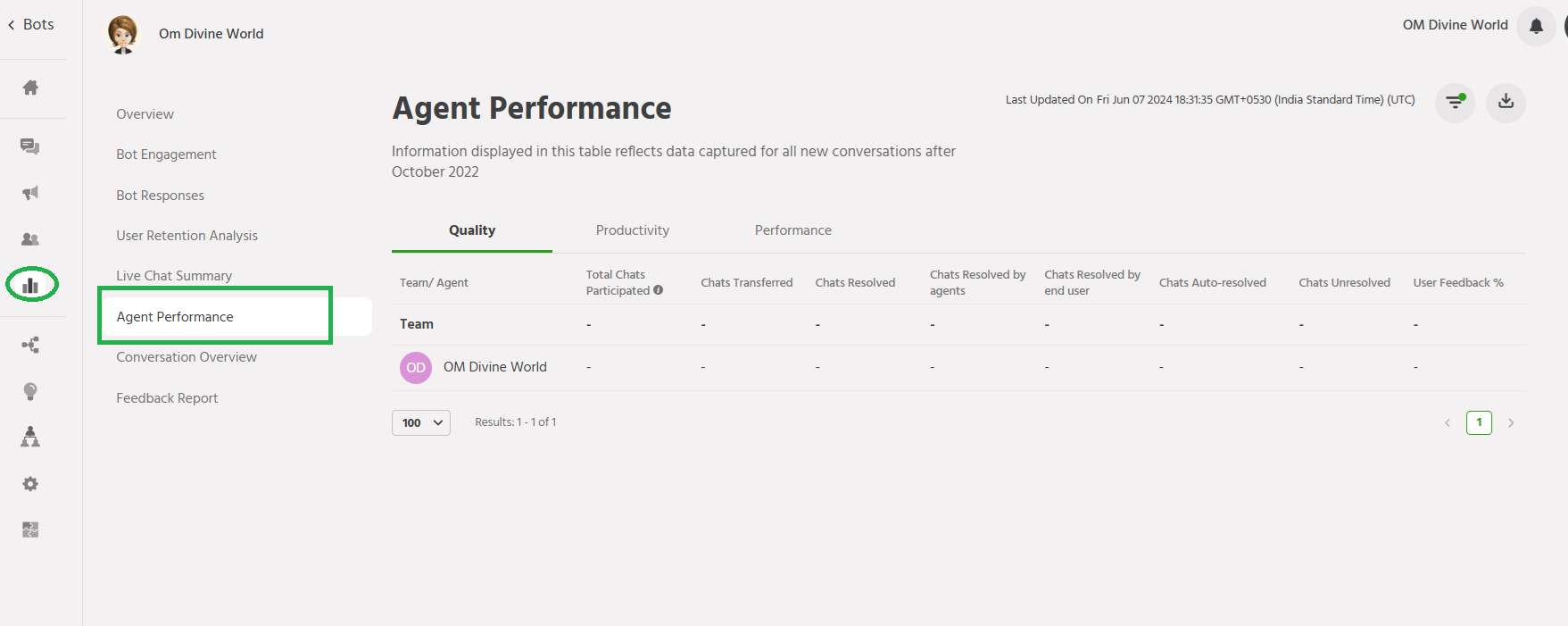
Total Chats Handled: Number of Chat handled (both new conversations + re-opened conversations handled by both bot and agent) for the chosen time range.
Chat Transferred : Number of chats transferred to another agent.
Chat Resolved : Total number of chats resolved under that agent.
User Feedback%: User Feedback is calculated as x% positive
First Response SLA%: Percentage of inbound requests where first response time is within SLA for first response
Resolution SLA%: Percentage of inbound requests where resolution time is within the SLA.
Filter
You can find the Filter Timeline option by click on ☰
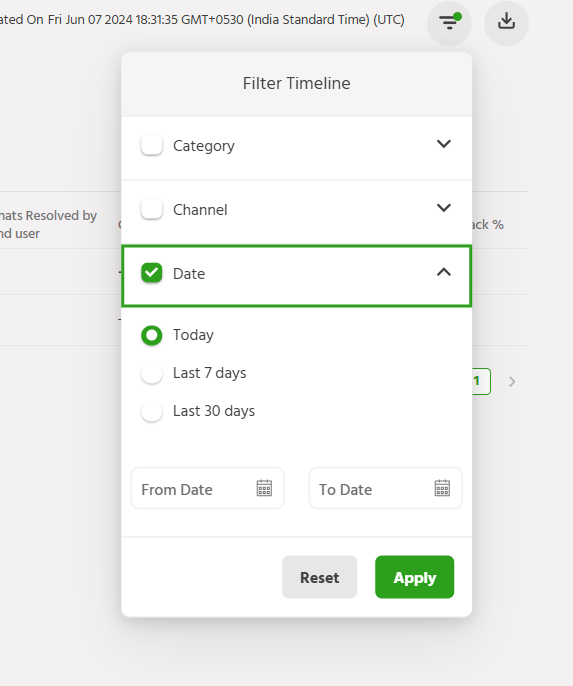
Following filters can be applied to further drill down the data,
- Category – Filters available on categories can be applied to get agent level data
- Channels – Channel wise data breakdown can be applied to get agent level data
- Date – Date filter can be applied on the agent level data, to get agent performance on a day level
New Agent Performance
The New Agent Performance provides valuable insights into your human agents’ efficiency in managing live chats. Tracking individual agent metrics helps you understand how well each team member is handling conversations and identify any areas for improvement.
Some key data points shown in New Agent Performance include:
- Active Time – The total duration agents spent actively chatting with customers during their shifts.
- Total Chats – The number of live chats handled by each agent.
- Avg Response Time – The average time taken for agents to respond to new chat messages from customers.
- Chat Resolution % – The percentage of chats that agents successfully closed after resolving the customer’s issue.
- Customer Satisfaction – Customer feedback ratings on the agent’s support quality.
Monitoring these metrics for each agent helps gauge their productivity, responsiveness, chat resolution abilities, and customer service skills. Comparing performance across your support team allows spotting top performers to learn from and agents who may need additional coaching.
Overall, the New Agent Performance dashboard enables optimizing your live chat capabilities by understanding each human agent’s strengths and weaknesses. Tracking individual metrics provides data to improve team collaboration, chat response times, issue resolution rates, and ultimately customer satisfaction.
Metrics
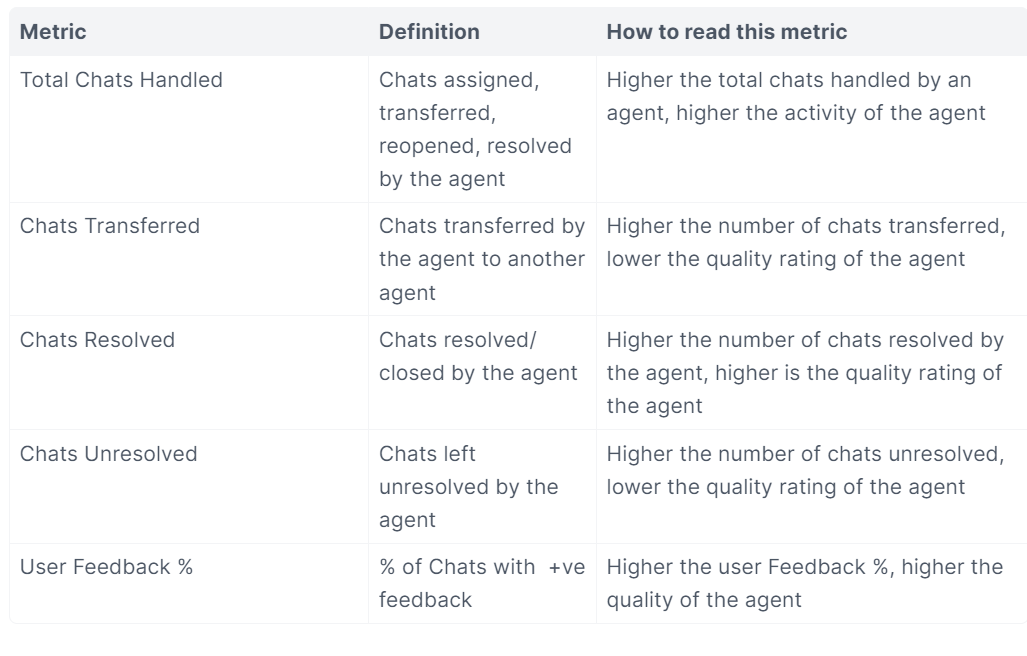
Quality Metrics
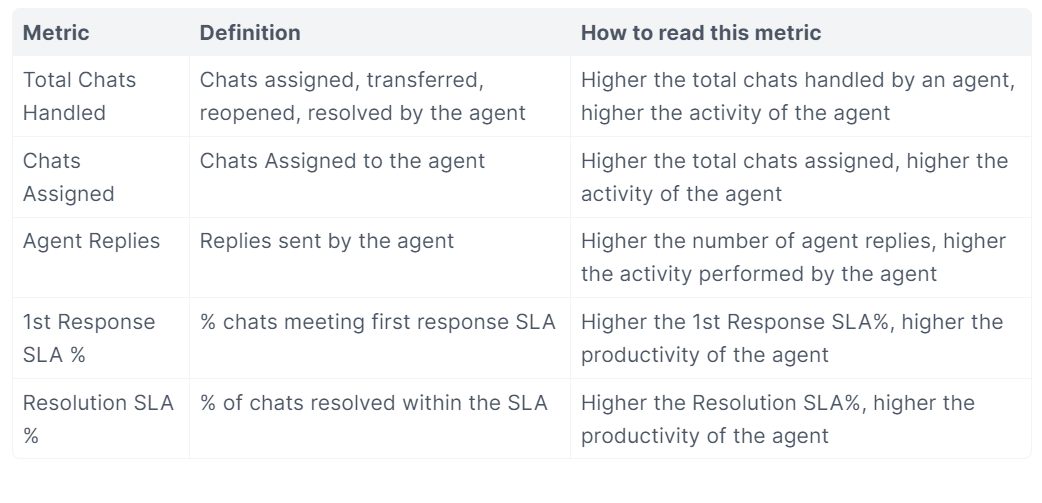
Productivity Metrics

If you face any issues or queries please reach out to us at support@orairobotics.zohodesk.com.