

Send MM Lite API Template
Sending Messages with MM API
To send a marketing template message, you will need to use a POST request:
The only difference would be on header where field of MM_lite should be yes It should be used only for Marketing messages.
URL
https://orailap.azurewebsites.net/api/cloud/Dialog
Header
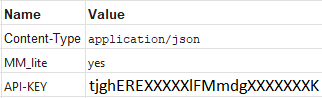
Body
{
“type”: “template”,
“messaging_product”: “whatsapp”,
“to”: “+91998XXXXX92”,
“template”: {
“namespace”: “909X65be_XXXX_XXXX_XXXX_1a2b06X4e482”,
“language”: {
“policy”: “deterministic”,
“code”: “en”
},
“name”: “june_csp_en1”,
“components”: [
{
“type”: “header”,
“parameters”: [
{
“type”: “image”,
“image”: {
“link”: “https://image.s3.ap-south-1.amazonaws.com/CRM_imageFirst/Diwaliletter-KulbhushansirWatsap2.jpg”
}
}
]
},
{
“index”: 0,
“parameters”: [
{
“payload”: “flow_welcome_44091”,
“type”: “payload”
}
],
“sub_type”: “quick_reply”,
“type”: “button”
}
]
}
}
Response
The same response from the Cloud API is expected after a successful message is sent using the MM API.
{
“StatusCode”: 200,
“Message”: “Message sent successfully via MM Lite (marketing_messages)”,
“Data”: {
“messaging_product”: “whatsapp”,
“contacts”: [
{
“input”: “91958XXXX881”,
“wa_id”: “91958XXXX881”
}
],
“messages”: [
{
“id”: “wamid.HBgMOTE5NTgwNzM3ODXXXXXXXXXXNTU2Mjc5NDYwRkXXXXXxOEJBAA==”
}
]
}
}
Fallback Mechanism
A new option is now available to route marketing messages via the MM API when possible. If a message is ineligible, it will automatically fall back to the Cloud API.
Benefits
- Continue using the standard cloud URL
- All marketing messages sent via the cloud URL are automatically routed to the MM API, provided the business is already onboarded with the MM API. This routing is seamlessly managed by the system when the
MM_liteheader is set toyes.
Warning
Messages sent very close to a Meta template recategorization may still pass through the Cloud API until the updated category is reflected in our cache.
The recommended approach is to achieve 100% of marketing templates going through the MM API and having a better performance.