

-
Welcome to ORAI Robotics
-
Building Your Bot
-
Docusense - Conversational Intelligence
-
Deploying The Bot
-
Broadcast Simplified
-
Tracking & Analytics
-
Activating Live Chat
-
Managing your account
-
ORAI Robotics for Shopify - What’s in it for you?
-
Generative AI
- Generative AI
- Docusense Search
- Guide to Custom Prompting
- Show Related Matches (SRM): Implementation Guide
- Configuring and Using Question Suggestions
- Enable LLM for Multilingual capabilities
- Gen AI Updates
- Configuring Conversational Intelligence (with LLM enabled)
- Understanding Prompts in Generative AI
- Configuring AI Response Settings
-
ORAI Robotics APIs
-
Platform Tutorials
-
Orai - User Guide
-
How to setup WhatsApp notifications
-
Marketing Campaigns and Automations
Retry Broadcast
Introduction
The retry broadcast feature enables you to resend previous broadcast messages to users who may have missed or not received them initially. This capability ensures that your important communications reach their intended audience, even if there were temporary delivery issues or other factors that prevented successful delivery during the initial broadcast.
By retrying broadcasts, you can follow up with users who did not receive your previous broadcast campaigns, increasing the chances of your message being seen and acted upon.
You can retry users who opened, did not open, clicked links, etc. from a WhatsApp broadcast campaign.
Note : This option is only available for 7 days after the initial broadcast is sent.
Availability
This is available under Broadcast > Broadcast History. Hover over the broadcast you previously sent and wish to retry, then click on the “…” button for further options.
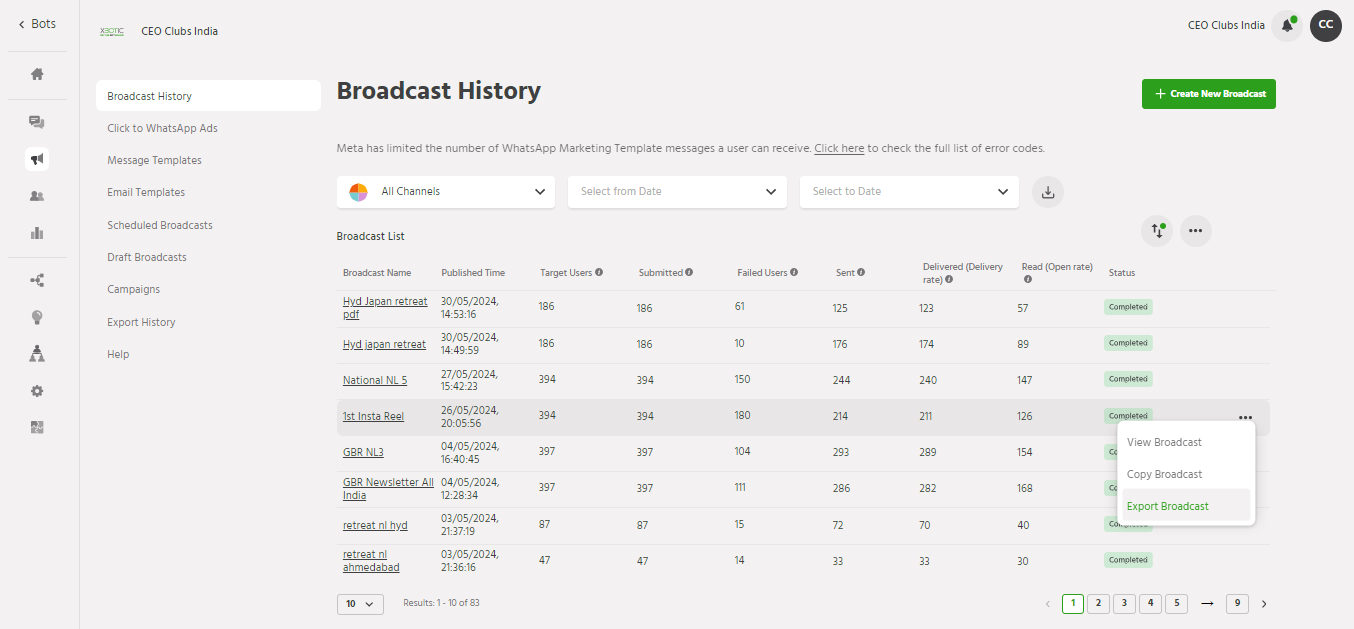
Setting Up
Step 1 : Navigate to Broadcast > Broadcast History.
Step 2 : Click on “Retry Broadcast”.

Step 3 : You will receive a confirmation message.
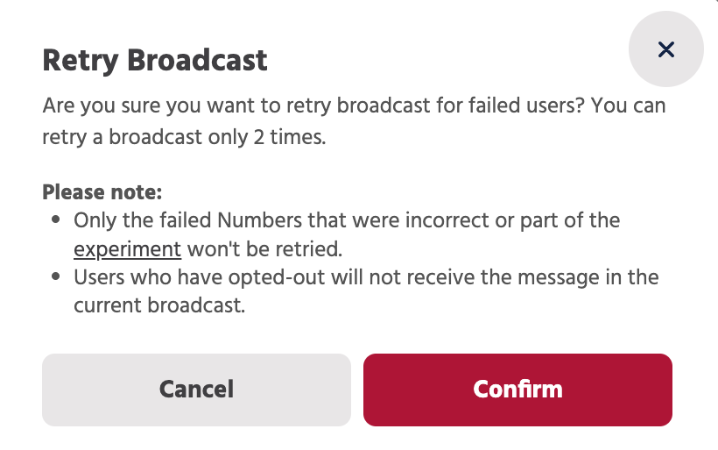
This is how you can Retry Broadcast and the ability to retry broadcasts provides a powerful tool for maximizing the reach and impact of your messaging campaigns.
If you face any issues or queries please reach out to us at support@orairobotics.zohodesk.com.