

-
Welcome to ORAI Robotics
-
Building Your Bot
-
Docusense - Conversational Intelligence
-
Deploying The Bot
-
Broadcast Simplified
-
Tracking & Analytics
-
Activating Live Chat
-
Managing your account
-
ORAI Robotics for Shopify - What’s in it for you?
-
Generative AI
- Generative AI
- Docusense Search
- Guide to Custom Prompting
- Show Related Matches (SRM): Implementation Guide
- Configuring and Using Question Suggestions
- Enable LLM for Multilingual capabilities
- Gen AI Updates
- Configuring Conversational Intelligence (with LLM enabled)
- Understanding Prompts in Generative AI
- Configuring AI Response Settings
-
ORAI Robotics APIs
-
Platform Tutorials
-
Orai - User Guide
-
How to setup WhatsApp notifications
-
Marketing Campaigns and Automations
Notification Settings
The Notification Settings allow you to configure when and how you receive communications from Orai Robotics.
With customizable notifications, you can optimize your Orai Robotics communication preferences. Receiving the right notifications at the right time helps you stay efficiently informed about account activity.
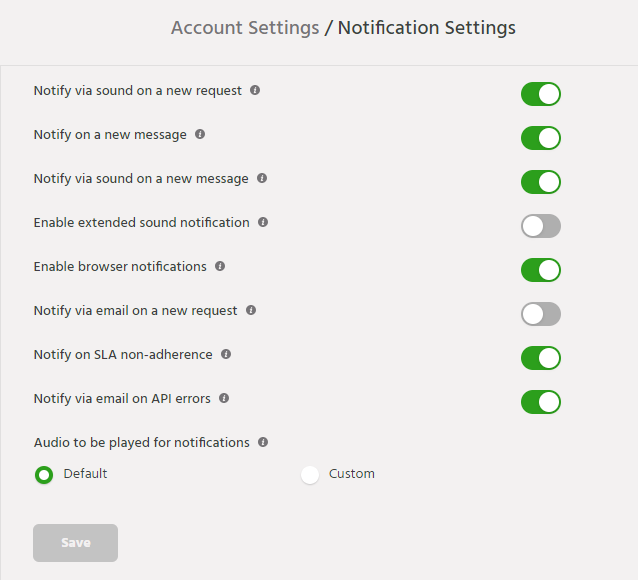
- Notify via sound on a new request : When this is enabled, agents will be informed via sound on each new conversation request assignment
- Notify via sound on a new message : When this is enabled, agents will be informed via sound on each new message from any active conversation
- Enable browser notifications : You can enable the browser based notifications by enabling it from the portal as well as browser.
- Enable Extended Sound Notification : Enabling this would ring the notification for up to four times.
- Notify via email on a new request : An email will be sent on the agent registered email id, for each new conversation assigned
- Notify on SLA non-adherence : Notification will be sent to supervisor and concerned agent, on SLA non-adherence
- Notify via email on API errors : If enabled, email notification will be sent for API Log errors
If you face any issues or queries please reach out to us at support@orairobotics.zohodesk.com
Table of Contents