

-
Welcome to ORAI Robotics
-
Building Your Bot
-
Docusense - Conversational Intelligence
-
Deploying The Bot
-
Broadcast Simplified
-
Tracking & Analytics
-
Activating Live Chat
-
Managing your account
-
ORAI Robotics for Shopify - What’s in it for you?
-
Generative AI
- Generative AI
- Docusense Search
- Guide to Custom Prompting
- Show Related Matches (SRM): Implementation Guide
- Configuring and Using Question Suggestions
- Enable LLM for Multilingual capabilities
- Gen AI Updates
- Configuring Conversational Intelligence (with LLM enabled)
- Understanding Prompts in Generative AI
- Configuring AI Response Settings
-
ORAI Robotics APIs
-
Platform Tutorials
-
Orai - User Guide
-
How to setup WhatsApp notifications
-
Marketing Campaigns and Automations
Error History
Introduction
When interacting with the ORAI Robotics chatbot, users may occasionally encounter errors. These errors can arise from various sources, including but not limited to:
Issues in integration node setup
Failures of external platforms
File upload errors
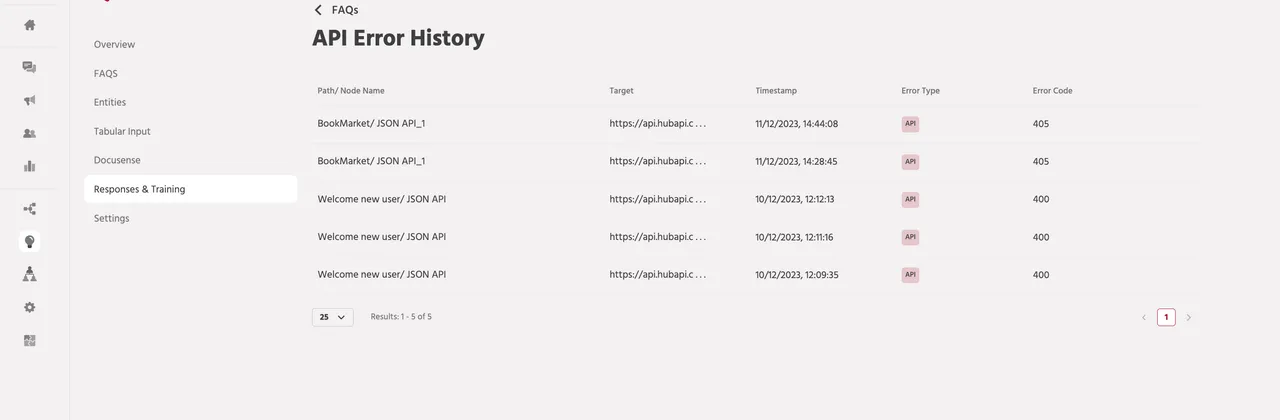
This document provides guidance on how to navigate to API Logs to understand the request and response body for further debugging.
Availability
To access the Error History, follow these steps:
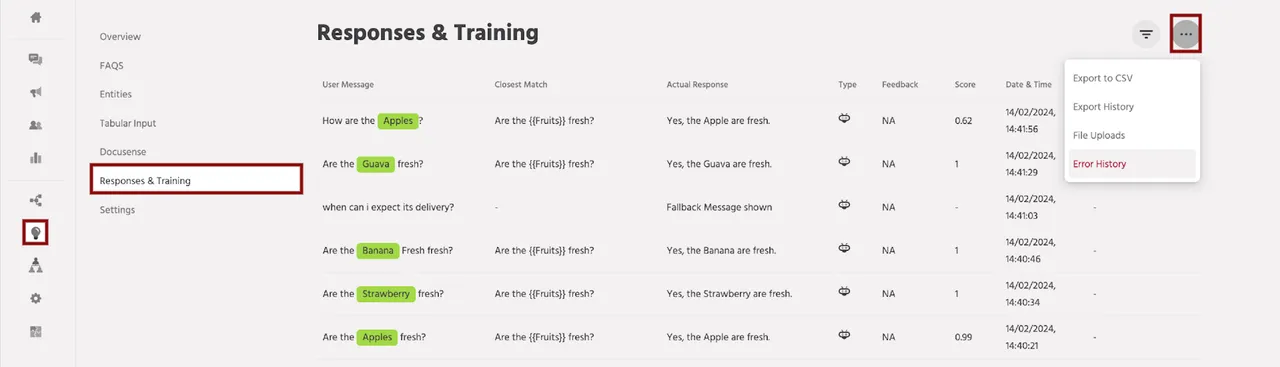
Navigate to the Train section from the left menu.
Click on Responses.
Click on the three-dot icon (⋮) and then select Error History.
Alternatively, you can directly go to Train > Responses & Training, click on the “…” button, and choose Error History.
Types of Errors Captured
The Error History feature captures the following types of errors:
- Integration node errors
- File Upload node errors
If you encounter any issues or have queries regarding the ORAI Robotics platform, please reach out to the support team at support@orairobotics.zohodesk.com.